


Trending on TikTok · #burningbridgesai
Drake Burning Bridges AI Video Generator
Upload one photo. You lead your own Burning Bridges chandelier party: the "where she at" search, the cup to the camera and the point.
$5.90 per video
1 photo in · 10s vertical MP4, your own party
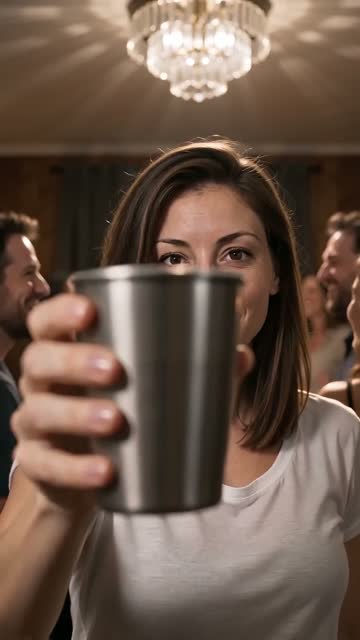
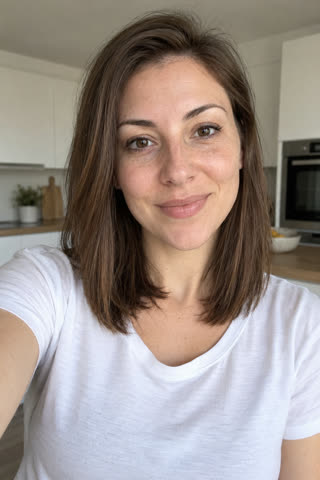
AI-generated example. The person is fictional.
Failed renders are refunded automatically.
Photos that work best
- Just you in the photo, looking at the camera
- Waist up or more, so your outfit carries into the party
- Face in good light, no sunglasses or masks
- No mirror selfies and no phone in your hand
What goes in, what comes out
- Input
- 1 photo: You, as the party lead
- JPG, PNG or WEBP, up to 10 MB
- Output
- Vertical 9:16 MP4, 720p, 10s
- Silent, so you can add the trend's sound on TikTok
- Time
- Usually 2–4 minutes
- Failed renders refund automatically
- Price
- $5.90 per video
- Credits work on every effect · no subscription
How to make the Burning Bridges AI video: one photo, three steps
- 1
Upload one photo.
Pick the length and tap the button. You sign in only when you pay.
- 2
We render your take.
Usually 2–4 minutes. Same scene, same moves, with you in it.
- 3
Download and post.
Add the trend's sound in TikTok so it lands on the trend page.
Other ways to make the Burning Bridges video
Reelsame needs one photo and your browser. No app to install, no template to find, no prompt to write.
| Route | Price | Sign-up | Length | What it takes |
|---|---|---|---|---|
| Renoise | 20 credits for 4s (about $0.33 on the $20 plan) | Before generating | 4s to 15s | Generates a new party scene from one photo; 480p and silent by default, the first video is free with a watermark, monthly plans only |
| Starrd template | 200 credits (about $10) | Yes | Varies | One-photo template on Seedance 2.5 at 480p, vertical |
| Felo | 86 credits per second at 768p | Pro plan | 5s, 10s or 15s | Video generation is Pro only |
| Dreamina (DIY prompt) | HK$119/month for 725 credits | Yes | Varies | Bring your own prompt; no free trial, watermark removal is paid |
| CapCut | — | CapCut account | — | No Burning Bridges AI template found on Oct 27; the one named "Burning Bridges" predates the song |
| Reelsame (this site) | $5.90 | At payment | 10s | One photo in your browser: no app, no template, no prompt. 720p. Failed renders refund credits |
Prices checked on Oct 28, 2026. They change often; check each site before you pay.
The clip, beat by beat
Every beat of the scene in this timing, in one continuous shot.
00:00
One hand up, scanning the room: "where she at"
00:03
Stepping out of the crowd toward the camera
00:05
The silver cup raised right into the lens
00:07
The point down at the camera on the beat
00:08
Hand on the chest, head back, nodding along
00:09
Turning away into the party
Real results, next to the photo they came from
All results are AI-generated. The people in the example photos are fictional.
Made by people on TikTok
Posts by other TikTok creators, played from TikTok. They were not made with Reelsame.
What is the Burning Bridges trend?
Drake released "Burning Bridges" with a music video on May 15, 2026: a handheld night in a private dining room under crystal chandeliers, Drake in a leather durag with a silver cup, scanning the room on the line "where she at?". In October 2026 people started using AI video to put themselves, TV characters and pets in his place, and #burningbridgesai climbed the TikTok Creative Center chart. Tools that feed the music video itself to the model get blocked by its real-face checks, so the versions that work, this page included, generate a new party in the same look around one photo.
- May 15, 2026Drake releases the "Burning Bridges" music video; it passes 28 million YouTube views.
- Oct 1, 2026Early AI edits appear: creators put themselves into the chandelier party.
- Oct 8–9, 2026A Michael Scott edit and the first tutorials spread; one walkthrough passes 1.3 million views.
- Oct 27, 2026#burningbridgesai is rising on the TikTok Creative Center US 7-day chart with over 3,000 posts.
Song: Burning Bridges
Where it spread
Sources
We do not provide the original footage or song. Add the trend's sound on TikTok.
How is this different from other Burning Bridges generators?
- A 10-second scene in 720p, from the "where she at" search through the cup and the point to the turn into the crowd, not a 4-second 480p clip.
- The party is generated around you, so it passes the face checks that block edits made from the music video itself; your own outfit comes with you.
- One photo, no prompt and no CapCut editing; the 9:16 MP4 is ready to post with the trend sound.
Who people put in it
- You
- You, in the clip everyone is posting this week.
- A friend
- A friend who said yes. Their photo, their moment.
- Family
- A partner, parent or sibling who agreed to star in it.
Pay per video. Spend it on any trend.
Pay per video. Credits work on every effect for 12 months. No subscription.
1 video
$5.90
- One full video on any effect
- No watermark, MP4 download
- Failed renders refund automatically
3 videos
$14.99$5.00 per video
Everything in 1 video, plus:
- 3 videos to spend on any effect
- Credits stay valid for 12 months
10 videos
$39.99$4.00 per video
Everything in 3 videos, plus:
- 10 videos to spend on any effect
- Credits stay valid for 12 months